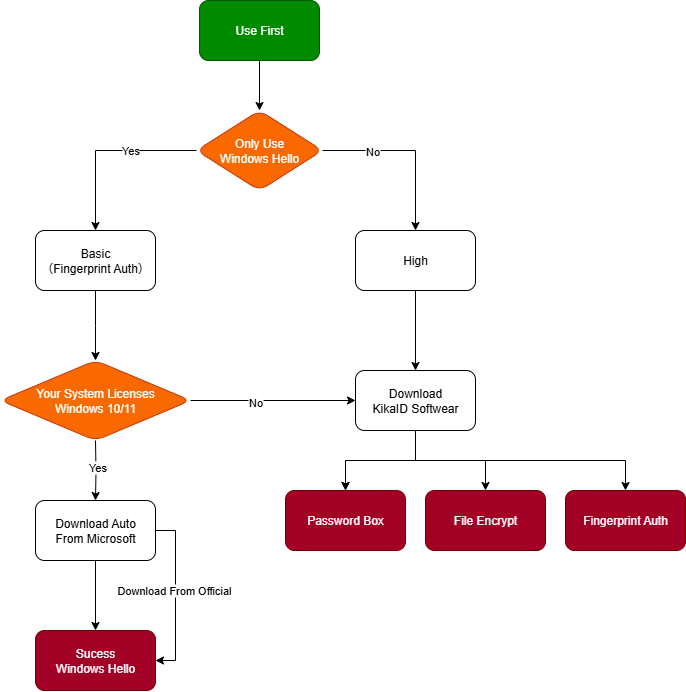
Software Download
KikaID Fingerprint Password Management Software/Tools downloads:
Choose "tools---KikaID management tool_x64"
KikaID software download address (click to jump to the download page)
Notice: The tools include Windows Hello driver!
FAQs about Kika Security Fingerprint Verification Device (Q&A)
1.What is the Kika security fingerprint productused for?
Fingerprint recognition is used to confirm the user's identity, so as to log in to the operating system conveniently and quickly, manage your account and password, and protect your personal privacy and digital asset security.
1. It is a system login. When you turn on the computer, you need to confirm your identity to enter the system. You can directly enter the system through fingerprint verification, so you don't need to enter the user and password;
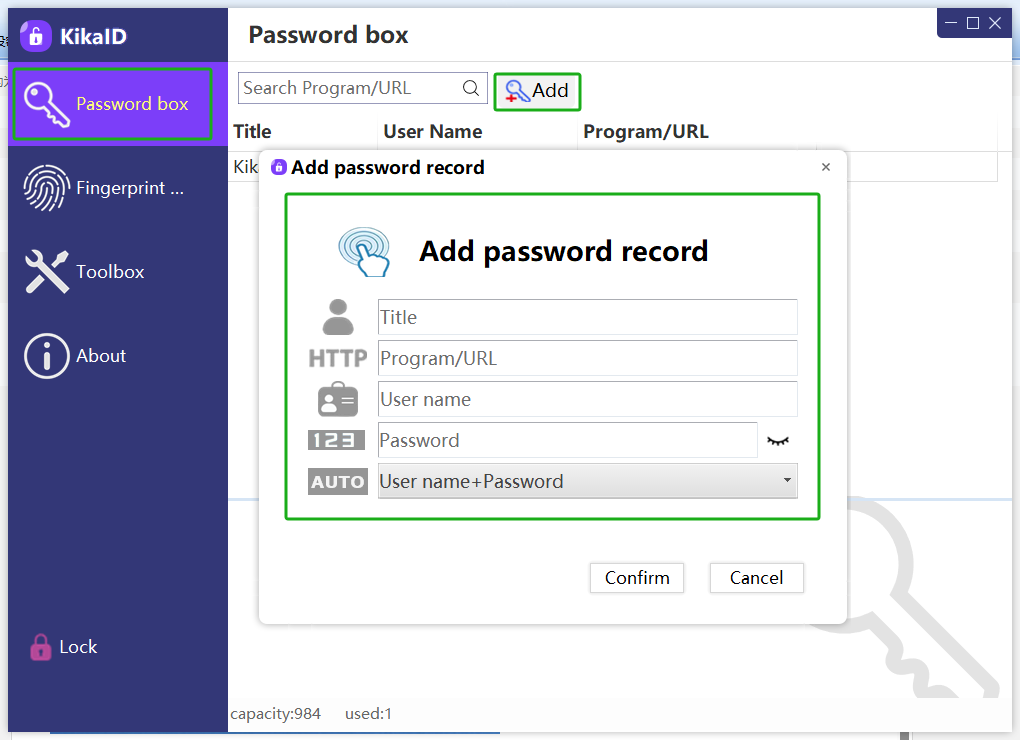
2. It is a password management box. In any place on the computer where you need to enter the account and password, click the middle button of the mouse, and you can call out the account and password with one click, so you don't need to remember any complicated account and password;
3. It is a file encryption dongle, which encrypts and saves files and folders through hardware password algorithm encryption. You must obtain hardware usage permissions through fingerprint verification to decrypt, thereby protecting your privacy;
So, Kika Security Fingerprint Product = Windows Hello Login + 1password/KeePass + File Encryption Dongle, it's three-in-one integrated security product.
2. I have a pirated Windows system. Can I use your product with it?
If you want to use the Windows Hello function, three conditions must be met:
1: Must be get license Windows system;
2: Must be Windows 10 or Windows 11 up;
3: Cannot be an Administrator (administrator user);
4. Must set location Password(PIN) at Windows.
So, if your system is not genuine, please upgrade to a genuine Win10 or above system first. If you are an administrator user, please add a new user.
If you don't want to change the above, we can also support it. You need to download the KikaID software and install it, bind your username and password, and you can also enjoy the convenience of logging in to the operating system through fingerprints.
KikaID software is not limited to genuine and pirated Windows, and it does not matter whether it is win7/win8/win10/win11, and whether you are an administrative user or not. There is no restriction.
3. If I purchase your product and use the fingerprint function, do I need to install the driver?
If your system is genuine Windows 10 or above, and you only use the Windows Hello function to log in to the system, you do not need to install the driver.
After you insert the Kika ID fingerprint product into the USB device, since our product has passed the Microsoft biometric authentication authorization, the driver will be automatically downloaded from Microsoft and installed automatically (the computer is connected to the Internet and allows updates).
However, the Kika ID fingerprint product is powerful, and the Windows Hello function login is only a fingerprint application. If you want to enjoy other functions, it is recommended that you download the Kika ID software for more convenient services.KikaID software download address (click to jump to the download page)Select KikaID fingerprint and password management software.
4. What if the fingerprint product I purchased is lost/broken Wouldn’t all the contents inside be lost?
We have a very safe and convenient backup mechanism, which can back up the account passwords saved in the fingerprint device on your computer and keep them properly.
When backing up, you need to enter the administrator password (remember the administrator password and do not use weak passwords), and use your administrator password to encrypt and save using the KDF algorithm. When restoring, you also need to enter the same administrator password and use the KDF algorithm to decrypt.
Similarly, the master key of the fingerprint product can also be backed up and restored.
Therefore, if your product is accidentally damaged or lost, please re-purchase the Kika Security product and restore the account password.
If you have a higher level of security needs, it is recommended that you purchase two Kika Security fingerprint products and back up/restore each other.
5. If my device is lost and picked up by someone, won’t all the accounts and passwords in it be stolen?
Kika Security's fingerprint products must verify the fingerprint or enter the administrator password before using the resources in the device. Fingers have natural textures, and it is almost impossible to have the same fingerprint; in addition, when using Kika Security's fingerprint products for the first time, you must remember to change the administrator password and remember it firmly in case of emergency.
The verification and comparison work of Kika Security's fingerprint products is completed inside the security chip, eliminating external intrusion interference; at the same time, the storage and main control chip are integrated, and the security chip authorized and certified by the National Cryptography Association can reach the financial security level, thereby eliminating the possibility of obtaining account passwords by reading hardware data.
Therefore, even if your device is lost and picked up by someone, you don't have to worry about password security issues.
6. Will the account passwords saved in the fingerprint device be obtained by developers or companies?
First, the account and password stored in the device are never uploaded locally (except for customer backup if necessary), nor are they uploaded to any backend through the Internet, which is several levels more secure than software account management;
Second, the Kika security main control chip uses a security chip authorized and certified by the National Cryptography Association, which can reach the financial security level and prevent disassembly and cracking;
Finally, our products comply with the SKF interface specifications of the National Cryptography Association and can pass security certification;
Therefore, it is impossible for developers and Kika Company to access user accounts and passwords.
7. Can the encrypted files be recovered by purchasing the same batch of Kika Security Fingerprint products?
No!
Each device generates a random key inside the chip, one machine and one secret. Unless the user actively backs it up, the master key will never be separated from the security chip in the device. Therefore, even if it is a Kika fingerprint product from the same batch, the files encrypted by other hardware products cannot be restored.
Unless the user actively backs up and restores the key, the previously encrypted files can be decrypted with a new device.
8. Can the product support multiple users? How many fingerprints can be recorded at most?
It can support multiple users.
Windows Hello reads the fingerprint information and compares the fingerprint feature information on the PC side through Microsoft's algorithm to see if it is consistent. Windows Hello supports multiple users, such as 10 fingers.
KikaID compares fingerprints in the main control chip inside the device, and can support up to 20 (versions/products may be different).
Therefore, you can safely enter multiple fingerprints and use them together.
All entered fingerprints represent one account in Windows Hello and KikaID.
9. Why has my fingerprint become less sensitive after not using it for a long time?
Our fingerprint products have a self-learning function, but due to space limitations, after learning for a period of time and becoming stable, they will no longer continue to learn and update.
If the user has not used the fingerprint for a long time, the recognition rate will be affected by the environment and the deformation of the fingerprint features. If you want a better experience, it is recommended to re-enter the fingerprint.
10. Where can I find a brief introduction and description of the product functions?
For a 1-minute functional video, please refer to the official website link: Safe Mouse Function Demonstration
Introduction to Kika Product Tools (click to watch the full example)
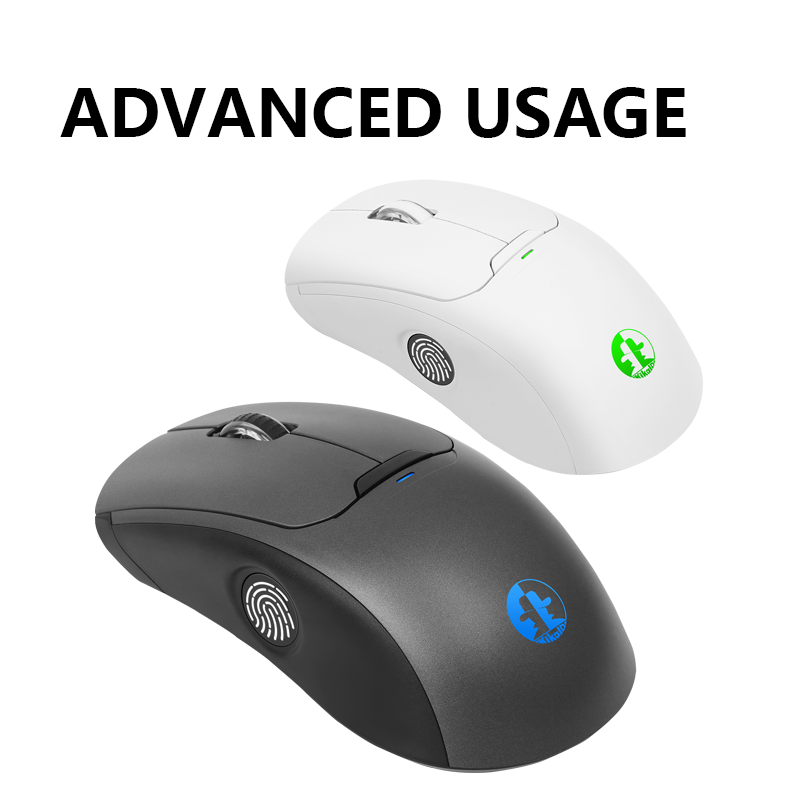
Kika Security Fingerprint products have different forms, but their fingerprint functions are basically the same.
11.How to use the password management tools
Software downloads;
Driver download address: Select "Software - KikaID Fingerprint Password Management Tool" to download
KikaID software download address (click to jump to the download page)

 KikaID
Shenzhen Kika Security Information Technology Co., Ltd. is a high-tech company at the forefront of information security.