For first-time use, a password needs to be set. After inserting the device, open the KIKAID software

After setting the password, it is necessary to enroll the fingerprint for the first time. After entering the password just set, the fingerprint can be entered

Next, you can use your fingerprint to log in to the KikaID software,
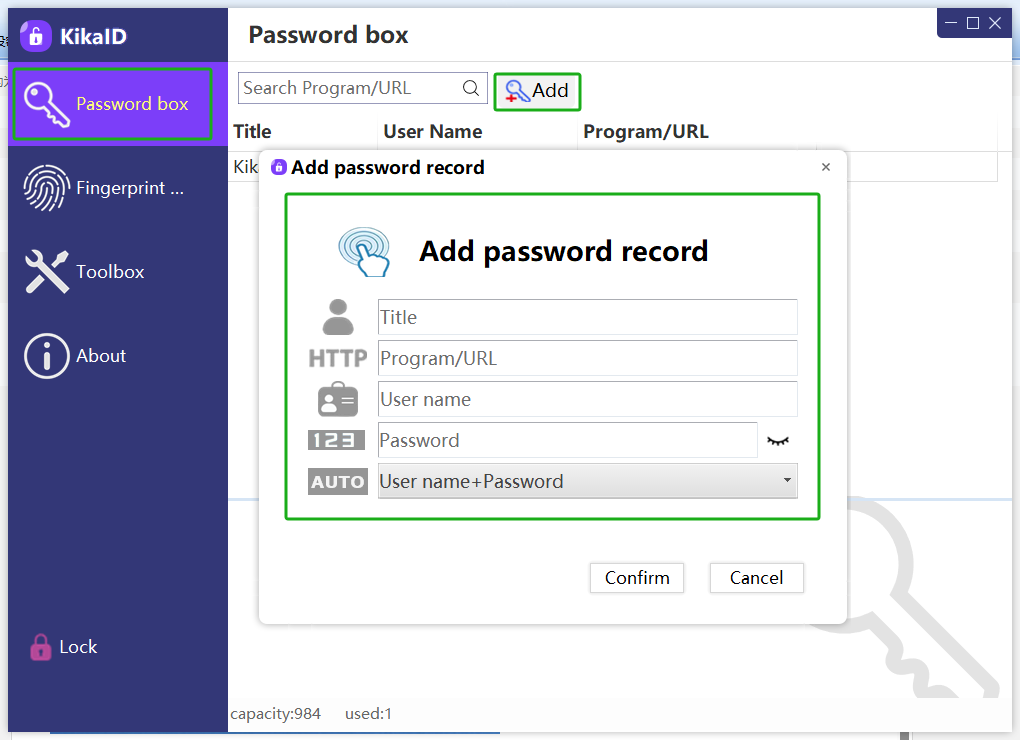
You can add a user password, and the information data is encrypted and stored in the device.

You can enroll a new fingerprint

If you have enrolled multiple fingerprints, you need to confirm which finger corresponds to which serial number, which can be determined by verifying the fingerprints

You can bind your fingerprint with the user password used to log in to the operating system quickly. It should be noted that if you need to use the Winhello feature, please disable the binding function here


Thank you for using KikaID's products and software


 KikaID
Shenzhen Kika Security Information Technology Co., Ltd. is a high-tech company at the forefront of information security.